This document is intended for external sales and support channels that are assisting existing and net-new Retail ISO partners in transitioning to the CoPilot and CardPointe platform.

The information on this page is for internal use only, and should not be shared or distributed to any party outside of the Fiserv organization.
CoPilot is a portfolio management portal designed as a singular replacement for existing boarding or account management tools, with ongoing development for expansion and enhancement of its capabilities. CoPilot allows partners to board new accounts, submit CardPointe and Clover equipment orders and track fulfillment, provision TIDs, control and view residuals/commissions, as well as monitor portfolio performance.
While CoPilot is the portfolio management portal for Retail ISOs, the CardPointe web interface and mobile app is the merchant-facing portal. The CardPointe web interface and mobile app allow merchants using the CardPointe Gateway to view transaction, funding, and settlement data, view chargebacks and retrievals, as well as use the Virtual Terminal to process transactions or issue refunds.
Application templates are available, which reduces effort in filling out the MPA by supplying default values for fields which typically remain consistent for all applications. Retail ISOs can override any default value from the application template before submitting the application for signature. The MPA and application templates are unique to CoPilot, meaning that existing MPAs cannot be transferred or migrated automatically.
The MPA can be sent to the account owner digitally, allowing them to complete, review and sign the agreement(s) online. A physical copy of the MPA can also be downloaded from CoPilot and provided to the owner if necessary. The MPA, account statements, CoPilot, and CardPointe all support custom branding, however registration emails, the email to complete and sign the digital application, and other account-specific emails are sent from CardPointe, and contain CardPointe branding.
Net new accounts will be boarded to the FirstData North platform exclusively. Many accounts qualify for automated underwriting review and approval, which typically results in a decision within a matter of minutes. Existing accounts (North & Omaha) can remain on their current platform and can be maintained within CoPilot and CardPointe as needed. Equipment and encryption keys for existing merchant accounts on both North and Omaha can continue to be used. Some historical data including merchant statements, deposits and funding information will be loaded to CoPilot and CardPointe.
Yes. The Partner Solutions training team will provide online training. Existing partners participate in approximately 3 hours of training, while net new partners can expect a more thorough training over the course of 1 week.
Yes. We assist the partner in loading their existing North and Omaha accounts into CoPilot and CardPointe.
There are currently no plans to allow boarding to the Omaha backend through CoPilot for Retail ISO. New accounts must be boarded to the North backend. Existing merchants using the Omaha backend are supported for maintenance purposes only.
AccessOne remains available for approximately 1-3 months during migration. Partners work closely with their IBM to ensure AccessOne isn't disabled until the partner is fully trained.
No. New application templates must be created in CoPilot as the AccessOne templates cannot be migrated.
Recreating the templates in CoPilot is often beneficial, as it provides the opportunity to review current templates, pricing, and potentially streamline the amount of templates.
The application templates in CoPilot can be edited before or during the boarding process and do not require any approval process for the changes to take effect. A template can be updated even after the template has been used, which is not currently supported in AccessOne.
No. CoPilot generates a dynamic MPA based on the fields selected at the time of boarding and aligns with the structure within CoPilot. This MPA can be dispatched from CoPilot for the merchant to complete, review, and sign digitally using their web browser. Alternatively, a PDF of the MPA can be exported from CoPilot to provide a physical copy to the merchant. Note that the MPAs for existing merchants will be migrated to CoPilot.
Yes, in most cases. For a merchant to sign the application digitally using their web browser, they must register for a CardPointe account. Registering a CardPointe user account does not require the merchant to use the CardPointe Gateway, CardPointe web interface, or the Virtual Terminal. When processing a paper application in place of using the digital signing process, CardPointe user registration is not sent, nor required.
CoPilot, CardPointe, statements, and the MPA can be branded, but email communication cannot. Emails are sent with CardPointe branding from a cardpointe.com email address and cannot be rebranded at this time.
Existing North FACS Partners - Yes, while boarding is accomplished via CoPilot and disabled in AccessOne, viewing details and reporting through AccessOne is still possible.
Existing Omaha Partners – No. North hierarchy does not get added to AccessOne, so partners will not be able to see their North back end merchants boarded through CoPilot in AccessOne.
Notes from Merchant Manager and other systems do not currently feed into CoPilot.
The Partner Admin team enters this information when the Partner Record is created in CoPilot.
Yes, if applicable to that partner.
Security Bundles for existing merchants can continue to be used and billed as they are now. Net new merchants can be configured with any of the following Security Bundles available in CoPilot:
Adding a security bundle that is not available in CoPilot can be accomplished after the account has been boarded.
| POS Category | New North Merchant | Existing North Merchant | Shipping | Merchant Billing |
|---|---|---|---|---|
| CardPointe Devices1 | CoPilot New Account Boarding2 | CoPilot Equipment Order3 | Devices ordered via CoPilot are shipped and tracking is uploaded to the order | Retail ISO is responsible for billing/invoicing |
| CardPointe Gateway/Virtual Terminal1 | CoPilot New Account Boarding4 | CoPilot Equipment Order3 | N/A | CARDPOINTE PLATFORM FEE (Y11) - Monthly INTERNET SET-UP FEE (30R) GATEWAY MONTHLY FEE (417) |
| Clover Devices1 | CoPilot New Account Boarding2,5 | CoPilot Equipment Order3 | Devices ordered via CoPilot are shipped and tracking is uploaded to the order | Retail ISO is responsible for billing/invoicing |
| First Data Devices1 | CoPilot New Account Boarding2 | CoPilot Equipment Order3 | Device shipment requires request made via FD POS or TASQ Web | Retail ISO is responsible for billing/invoicing |
| Other Devices (non-CardPointe/Clover/FD)1 | CoPilot New Account Boarding2 | CoPilot Equipment Order3 | Device shipment requires request made via FD POS or TASQ Web | Retail ISO is responsible for billing/invoicing |
| Hosted Payments Page6 | CoPilot New Account Boarding7 | CoPilot Add-On7 | N/A | Not billed separately. See CardPointe Gateway fees. |
1. Include preferred device settings such as Tip Adjustment, Auto-Close, etc. in the order notes.
2 Create new equipment order during boarding.
3 Access Customers → Account Status or DBA Name → Orders → New Order to submit orders for existing accounts.
4 The CardPointe Gateway is automatically added to new accounts by default. Virtual Terminal is included as a CardPointe Gateway feature. If the ISO removes the CardPointe Gateway at time of boarding, the Virtual Terminal is inaccessible.
5 Include new equipment order during boarding to ship the device to the merchant. Use the Clover Dashboard or MTOS instead for provisioning only.
6 Requires CardPointe Gateway.
7 Access Customers → Account Status or DBA Name → Account Detail → Add-Ons to add features and services.
| POS Category | New Omaha Merchant | Existing Omaha Merchant | Shipping | Merchant Billing |
|---|---|---|---|---|
Clover Devices | New merchants cannot be boarded to the Omaha platform | CoPilot Equipment Order1 | Devices ordered via CoPilot are shipped and tracking is uploaded to the order. | Retail ISO is responsible for billing/invoicing |
| First Data Devices | CoPilot Equipment Order1 | Device shipment requires request made via FD POS or TASQ Web | Retail ISO is responsible for billing/invoicing | |
| Other Devices (non-Clover/First Data) | CoPilot Equipment Order1 | Device shipment requires request made via third party supplier | Retail ISO is responsible for billing/invoicing |
1 Access Customers → Account Status or DBA Name → Orders → New Order to submit orders for existing accounts. Include preferred device settings such as Tip Adjustment, Auto-Close, etc. in the order notes.
For CardPointe devices or the CardPointe Gateway, contact CardPointe Support.
For non-CardPointe devices, continue to use the current support numbers:
| Supplier | Contact Number |
|---|---|
| CardPointe | 1-800-828-0720 |
| Omaha | 1-800-828-0210 |
| North & Nashville | 1-800-542-1894 |
| BUYPASS | 1-800-726-2629 |
| Clover Omaha | 1-844-864-5449 |
| Clover North | 1-844-844-5450 |
The ISO should contact the Partner Solutions Service Team at 1-800-337-1222.
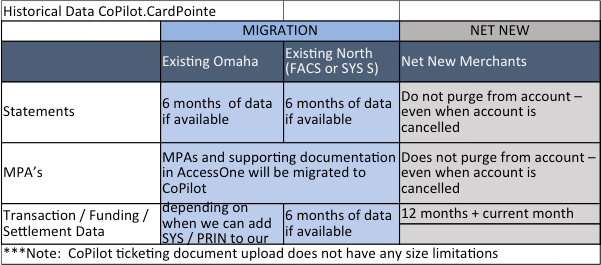
For existing North and Omaha accounts, the MPA will transfer to CoPilot, as well as the previous 6 months of statements. For North accounts only, the previous 6 months of transaction, funding, and settlement data will be migrated. Reference the image below for additional information.
The migration of historical transaction, funding, and settlement data for Omaha is planned and will be possible as soon as the data is added to our data feeds.
Reporting for funding, retrievals, and interchange are available within CoPilot or CardPointe for North accounts. For Omaha accounts, these reports are not available through CoPilot, but can be accessed using one of the systems outlined in the table below:
| Report Type | Report Description | North | Omaha | Comments |
|---|---|---|---|---|
| Funding Detail | Displays all debits and credits that make up a funding transfer | Yes | No | For Omaha accounts, view statement or access via ClientLine |
| Interchange | Displays interchange qualification by plan code | Yes | No | For Omaha accounts, view statement or access via ClientLine |
| Retrievals | Displays retrievals (soft chargeback / pre-chargeback) | Yes | No | For Omaha accounts, access ClientLine or Dispute Manager |
Partners and merchants will not lose access to ClientLine. CoPilot supports advanced filtering and exporting to a file, which may produce similar reports when configured. For security, CoPilot does not include a function for emailing reports.
Yes. The following options are available but not required:
When added to an account during boarding, entering the fee amount is required. When not added during boarding, or if using a Security Bundle not available in CoPilot, create a CoPilot ticket to request the Security Bundle be added to the account.
Clover App usage reporting is not yet available within CoPilot. The Clover Dashboard can be used to view Clover App usage for individual merchants.
No. The CardPointe Gateway uses CardSecure for encryption and tokenization, so TransArmor is not necessary. You can read more about CardSecure on the CardConnect Support Center.
No. The Dashboard provides an overview of the entire portfolio, and is updated as account states and account activity change.
Chargeback and Retrieval events are listed in CoPilot and CardPointe. Any response to these events must be carried out through eIDS or USPS mail, however.
Details for the transaction in question can be viewed in CardPointe for any transaction that passed through the CardPointe Gateway. Retrievals events are not displayed for accounts using the Omaha platform.
Yes. The below fees will apply in addition to the CoPilot/CardPointe fee until merchants are no longer using the Payeezy Gateway.
| Name | Code | Description |
|---|---|---|
| GGe4 Authorization | 5950 | Per item fee for each authorization inquiry originated by a Global Gateway e4 merchant account. |
| GGe4 AVS | 5951 | Per item fee for each Address Verification Service (AVS) request originated by a Global Gateway e4 merchant account. |
| GGe4 One Time Set Up Fee | 5952 | A one-time set-up fee to access the Global Gateway e4 through either a standard web browser or a customized website solution. Access allows the merchant to accept and process card transactions. Fee is per merchant ID. |
| GGe4 Monthly Fee | 5953 | Monthly maintenance fee charged per MID, per month, for access to the Global Gateway e4. |
The PCI compliance status should be hidden for all Retail ISOs. If not already hidden, the partner should contact their assigned CSA to suppress the PCI compliance status.
Yes. Clover equipment is available in CoPilot for ordering during boarding as well as later, if additional equipment is needed.
No. Gift cards can continue to be ordered through Merchant Service Center (MSC).
Hardware is deployed from FHS (previously referred to as FDHS or TASQ), or another third-party like POS Portal. The CardPointe Gateway, CardPointe Terminals, and Clover terminals are available within CoPilot, as well as the ability to provision TIDs, Download ID, etc.
No. Existing encryption or injected keys remains the same.
Reference https://shop.cardconnect.com for the equipment currently available in CoPilot.
First Data equipment can still be ordered through FD POS and is fulfilled by FHS/FDHS/TASQ.
Equipment orders placed via CoPilot before 3pm ET, Mon-Fri, are started the same day.
The owner's account is issued a Super Admin account, while additional users can be created as an Admin or Standard account. Super Admin and Admin accounts are equivalent in capability, however the Super Admin account is unique to the owner. The Super Admin account cannot be deleted.
All CoPilot user types are able to place equipment orders, however it is suggested to create a Standard user in most cases, as Admin accounts have access to residual data.
Yes. A partner can create an account for a sales agent to view only accounts that are boarded under their CoPilot Sales Code.
No. Merchant support requests are directed to the Retail ISO. The merchant can view the contact details for their Retail ISO within the Support tab of CardPointe.
These contact details are gathered and entered during partner creation, although the contact details can be updated at any time by contacting the CSA.
Sales Codes are used in CoPilot to control permissions, while the First Data Sales Rep ID or First Data Salesman ID is used specifically to separate residual reporting by sales rep.
PASO continues to be the residual engine and payout mechanism for Retail ISOs. Monthly PASO reports are available in AccessOne, MSO, and via email. We are currently working on an enhancement that will soon allow partners to access PASO reports in CoPilot.
The CoPilot version of residuals are available in CoPilot. This reporting offers the capability to produce sub-ISO or sub-rep calculations (similar to the Residual model in AccessOne).
All net-new merchants are boarded with the detailed statement setting enabled. The statement setting can be changed to a summary report any time after boarding, by submitting a CoPilot ticket (see the Ticketing section for more details). The merchant receives an email notification monthly when the statement becomes available in CardPointe.
| Data Type | Retention Period for New Merchants |
|---|---|
| Statements | Does not purge from the account, even when the account is cancelled |
| MPAs | Does not purge from the account, even when the account is cancelled |
| Funding/Settlement Data | Previous 12 months, plus the current month-to-date data |
Yes. Data will continue to flow through to IRIS for partners that use it.
CoPilot includes a Churn Score in the Customers table, which can be enabled to view the account's estimated risk of attrition, or churn. The factors thought to contribute to the account's score can be viewed by clicking the account and then accessing the Churn Probability details from the Account Summary page. If PCI Compliance is determined to be one of the potential factors, this can be ignored. Work is in progress to suppress this factor, so that it does not incorrectly affect the PCI Compliance status.
Additionally, a funding alert can be configured to alert the ISO when an account has not had a funding event for specific number of days.
ISOs should work with the Implementation Manager to brand the MPA, statements, CardPointe, and CoPilot. Note that emails sent to merchants will continue to use the CardPointe branding and are sent from a CardPointe email address.
All PII is masked by default within CoPilot, with special permissions required to unmask this data.
Yes. There is no ability to unmask card numbers within CoPilot or CardPointe.
Yes. You can view the current status of CardPointe and CoPilot at https://status.cardconnect.com/.
Yes.
Yes. Partners can access CoPilot via the browser on iOS or Android devices.
Merchants can download the free CardPointe Mobile app for iOS and Android in order to view transactions and run sales from their phone or tablet. Some sensitive information is not available within the CardPointe app, such as statements and chargebacks/retrievals.
Yes. The Buypass frontend is supported.
Yes. CoPilot requires a minimum set of data to create a new account and send the application to the merchant for signing, but additional merchant data can be entered by the partner if available. For bank information, this data is verified digitally in CoPilot using GIACT + Plaid when entered in CoPilot by the ISO, or when entered by the merchant during the digital application process. When the banking information can be verified digitally, a voided check is not necessary.
Yes. Physical copies of the MPA, as well as other documents that may be required for boarding can be uploaded and submitted through the CoPilot web interface. There is no size limitation for document or file uploads in CoPilot.
Select the More than 30 days option.
Yes. These are referred to within CoPilot as Application Templates and can be used to set standardized boarding data and pricing for fields that typically remain constant. Application templates can be updated easily at any time, and standard values from the template can be overridden before submitting the application.
Note that standard users do not have the ability to create application templates.
Custom fields can be created in CoPilot to notate additional information that is not already collected, such as associated account numbers, specific industries or market segments, average life span of this account type, etc. Custom fields can be shown within the tables in CoPilot, as well as included in file exports for reporting and analytic purposes.
There are no definitive requirements. Whether or not the account enters into the auto-approval underwriting process is based on a number of factors. Certain criteria may require the account be reviewed manually, however the turnaround for accounts that require manual review is typically 24 hours.
ISOs receive an email for accounts that do not pass through the auto-approval underwriting process, which includes a CoPilot ticket to track the status of the manual review. Accounts that enter the manual underwriting process typically receive a decision within 24 hours.
Yes. The ISO receives a notification email with a link to a CoPilot ticket whenever an account requires manual review for underwriting. It is also possible to log in to CoPilot and select Tickets to review the ticket. ISOs can track the status here, submit a comment or a question to the ticket assignee, or upload any necessary documents to complete the underwriting review.
Yes, if the legal name, signer, and pricing are the same for each account. If ten or more accounts are being boarded at the same time, ISOs can submit a Multi-Location Form to Underwriting. The ISO would populate data for the first account, attach the spreadsheet to a CoPilot ticket, and notify the Underwriting team of the multi-location request.
Note: If accounts are being cloned after boarding, the client must enter each location individually in CoPilot.
No. The Support tab of CardPointe displays the Retail ISO's contact information. Merchants should contact the Retail ISO directly with any support issues.
Yes. Retail ISOs can create a ticket in CoPilot for both partner-related concerns, such as updating branding, and merchant-related tickets, such as updating merchant bank details.
View this ticketing map for an overview of all ticket reasons, required information/documentation, and SLAs. Cancellation/Reinstatement requests, Pricing Updates, Seasonal Holds, Telecheck, and Gift Card requests must be submitted via the Merchant Service Center (MSC). All other requests can be made through CoPilot.
Yes. A BAM upload/pricing request can be made through MSC.
Service Center Web is no longer needed but all of the important Service requests are now accounted for in CoPilot and will still continue to route to the CSA/ISO Solutions Service team. This is driven by the preferred subscriber option in CoPilot permissions. General account maintenance changes, boarding, and underwriting inquiries will route to the respective teams.
No. The CardPointe Gateway is automatically added during the boarding process, but there is no requirement to use it. Boarding requires at least one order (piece of equipment or platform), and automatically including the CardPointe Gateway satisfies this requirement for accounts that plan to order equipment after boarding, rather than during.
Note: If necessary, it is possible to have the CardPointe Gateway removed by submitting a CoPilot ticket.
Yes. If it's supported on the First Data North platform, such as Payeezy.
Devices that are certified through Fiserv are supported, but may not be available for ordering via CoPilot. If the terminal is not available within CoPilot, then boarding must be completed before ordering terminals from outside of CoPilot.
For example, once the account has been issued a MID in CoPilot, it is then possible to place an order via FD POS and create the TID.
No. Cash Discount is not supported and not currently on the project roadmap.
No. Surcharge is not currently supported, but on the project roadmap to complete phase 1 by end of year.
No. The BluePay Gateway and BlueChex is not supported for Retail ISOs.
Contact the CBE with any questions on partner fees.
No. There is no CardPointe app available for the Clover dashboard.
Yes. A mobile app is available for iOS and Android, and provides access to merchant account and processing information, as well as being integrated with the CardPointe Gateway to accept mobile payments using the ID TECH VP3300.