-
Click Residuals in the left nav.
-
Select the desired Processing Period from the table.
-
Click the MID of the merchant that you wish to view interchange details for.
-
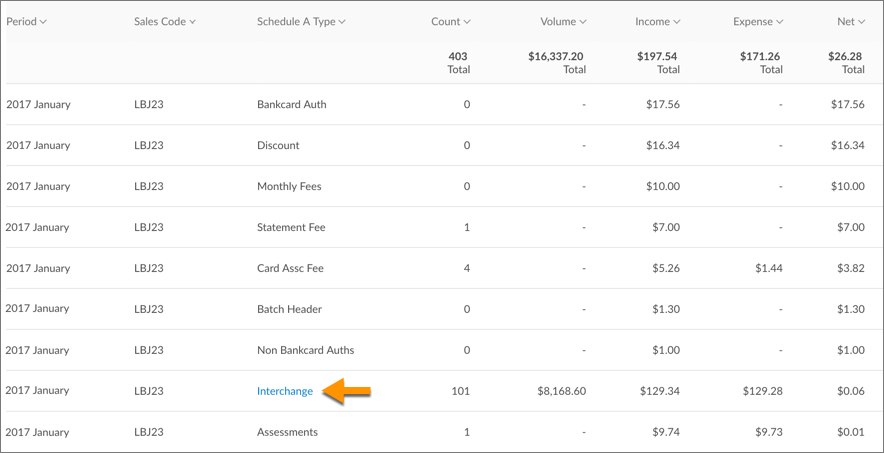
Scroll down and click the Interchange link within the "Schedule A Type" column.
-
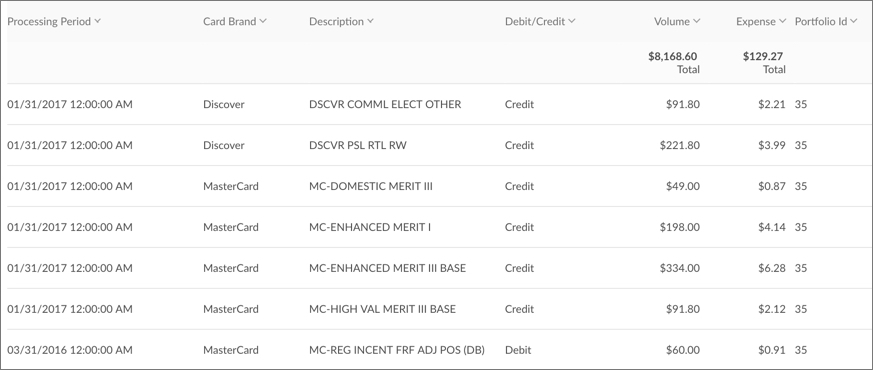
The interchange details are broken down by card brand, as well as by the processing platform (North or Omaha - refer to the "Portfolio Id" column).



Overview
Interchange costs are the fees that merchants must pay in order to accept credit card payments from customers. The fees are paid to the bank that issued the payment card to cover handling costs, fraud and bad debt costs, and any risk involved in approving the payment. These rates are determined by the card associations and vary based on card type, purchase amount, and how transaction data is specified. In total, there are over 300 levels of interchange.
To provide you with insight into the interchange costs incurred by your merchants, CardConnect provides a breakdown of your merchant's Interchange details in CoPilot. The content in this article is intended to help you to:
- Learn how to view your merchant's Interchange details in CoPilot.
- Understand how to read Interchange Details.

The content in this article is intended for CardConnect's employees and partners only.
When viewing a residual report, you have the ability to view a breakdown of interchange details for your merchants based on card brand. To view interchange details for a merchant during a specific period:
Understanding the Interchange Details Table
The Interchange Details table provides a breakdown of interchange details for your merchants based on card brand. The information below describes what each column of the Interchange Details table means.
| Table Column | Description |
| Processing Period | The month in which the transaction occurred. |
| Card Brand | Visa, MasterCard, Discover, or American Express |
| Description | The actual card type that was processed. |
| Debit/Credit | If the payment card is tied to a bank account, "Debit" displays. If not, then "Credit" displays. |
| Volume | Dollar amount processed under this card type for this processing period. |
| Expense | The interchange cost applied to the volume and number of transactions. |
| Agent ID | The ID of the partner who boarded this account |
| Portfolio ID | This information is used by CardConnect for internal identification purposes when processing residuals. |
| Processor Reporting MID | The merchant ID number associated with the set of transactions. |
| Count | The number of transactions run under this card type. |
| Processing Period ID | This information is used by CardConnect for internal identification purposes. We will be removing this column from the table soon. |
| Production Code | This information is used by CardConnect for internal identification purposes. We will be removing this column from the table soon. |
Interchange Qualification Matrix
The Interchange Qualification Matrix (IQM) is provided by First Data and defines the qualification criteria for the various Interchange levels. Interchange requirements are established by the payment card brands (Visa, MasterCard) and there are numerous variables that impact interchange fees, including but not limited to:
- whether the payment card was present vs. not present during the transaction.
- the type of goods or services being bought.
- whether a debit card, credit card, or corporate card was used for payment.
- whether it was an international transaction.
Download the Interchange Qualification Matrix
To download a .PDF of the IQM, click the link below:

For additional information, please visit the respective interchange sites provided by Visa and Mastercard.